Ready-made templates
Every widget type comes with templates, so there's always somewhere lovely to start.
Little widgets, made by you. Pick from 139 widget types, start from a ready-made template, and make it your own in a live editor.
Every widget type comes with templates, so there's always somewhere lovely to start.
Colours, fonts, backgrounds, photos and layouts, previewed live as you edit.
Tick off a task, log a glass of water or start a timer, right on the widget.
Home Screen, Lock Screen, StandBy, Apple Watch, Control Center, Mac and Vision Pro.
iPhone · iPad · Apple Watch · Mac · Apple Vision Pro · iOS 26 or later
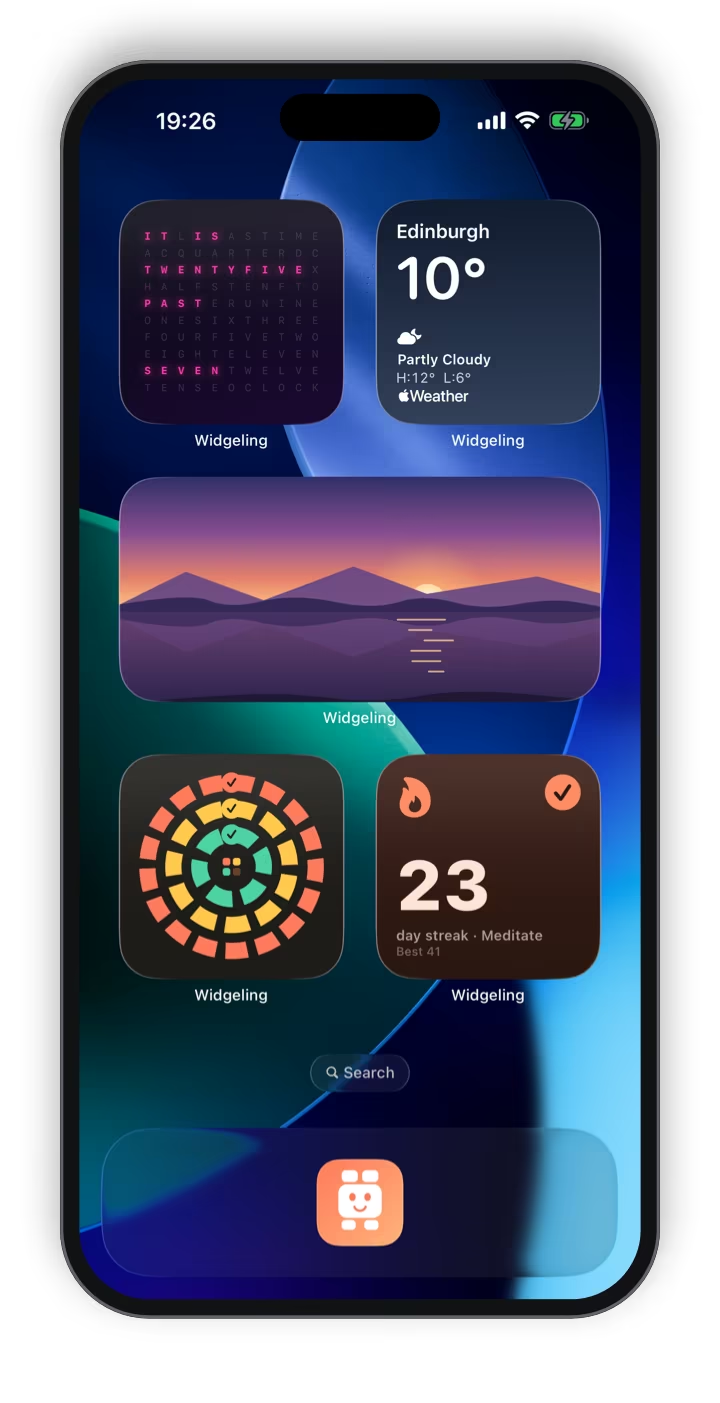

Widgeling is a custom widget maker for iPhone, iPad, Apple Watch, Mac and Apple Vision Pro. It turns your Home Screen, Lock Screen, StandBy and watch face into something that's yours: pick from 139 widget types in 21 categories, start from a ready-made template, then change the colours, fonts, backgrounds, photos and layout in a live editor.
Most of it is free, with no account to make: 112 of the 139 widget types, the editor, every theme and palette, and as many designs as you like. Widgeling Pro adds live data - Apple Weather, air quality and pollen, stocks, crypto and currencies, sports and flight status. Your designs sync through your own private iCloud.
Widgeling is made by Dave Ellis, an award-winning web and mobile developer in Edinburgh, Scotland, and published on the App Store by The Racing Line Software Limited.
| What it is | A custom widget maker: 139 widget types, ready-made templates and a live editor |
|---|---|
| Works on | iPhone and iPad with iOS or iPadOS 26 or later, Apple Watch (watchOS 26), Mac (macOS 26) and Apple Vision Pro (visionOS 26) |
| Where widgets go | Home Screen, Lock Screen and StandBy; Apple Watch faces and the Smart Stack; Control Center; Live Activities; the Mac desktop; Vision Pro |
| Widget types | 139 in 21 categories, 112 of them free |
| Styles | 31 themes and 60 palettes, or build your own |
| Price | Free to download. Widgeling Pro is £0.99 a month or £9.99 a year, with a 7-day free trial on the yearly plan |
| Pro adds | Live data: Apple Weather, air quality and pollen, stocks, crypto and currencies, sports, and flight status, with push updates |
| Account needed | No |
| Where your designs live | On your devices and in your private iCloud database |
| Ads, analytics, tracking | No tracking, analytics or third-party ads. Free shows one banner for my motorsport app, The Racing Line |
| Family Sharing | Yes: Pro is shared with up to five family members |
| Made by | Dave Ellis, Edinburgh, Scotland |
| Published by | The Racing Line Software Limited |
| App Store category | Utilities |
| Help | Support · Privacy policy |
Clocks to countdowns, photos to the phases of the moon. Every widget type comes with ready-made templates, so you're never starting from a blank square.
Digital, analogue and word clocks, and world time for the places you care about.
Today's agenda, what's up next, month views, birthdays, and to-dos you can tick off.
Days until and days since, for birthdays, trips and everything in between.
Tap-to-log buttons right on the widget, for habits, water and mood.
Timers, a stopwatch and Pomodoro, started from the widget.
Moon phase, sunrise and sunset, and golden hour, worked out on your device.
Steps, distance, activity and sleep from Apple Health, read on your device.
Single photos, shuffles, collages, and memories from this day in years gone by.
Quotes, sticky notes, your own words, and something new to learn each day.
Battery, storage, QR codes, loyalty cards and app launchers - plus dice, a pixel pet and generative art.
Apple Weather, air quality and pollen, stocks, crypto and currencies, sports fixtures and tables, and flight status.
Free and ProAll 21 categories
From the Gallery to the editor to your Home Screen, Lock Screen and wrist.

Browse 139 widget types and their templates, by category or by search.

Change colours, fonts, backgrounds, photos and layout, and see every change as you make it.
A word clock, weather, a photo, activity rings and a streak, each designed in Widgeling and placed like any other widget.

Design glanceable widgets for under the clock, previewed on a real Lock Screen. They work in StandBy too.

Complications for your watch face, Smart Stack widgets and a watch app of its own.

On iPad, the Gallery and editor have room to breathe, and your designs stretch all the way to the extra large widget size. They sync with your iPhone through your own iCloud.
Every design is yours to change, from the first template to the last pixel - and then it goes everywhere you do.
Start from a template in any of the 21 categories, then change as much or as little as you like.
Colours, fonts, backgrounds, photos and layouts, previewed live, with undo and version history.
Restyle any design in a tap, or build a theme of your own.
Restyle your whole Home Screen in one go, with widgets that match.
Tick off a task, log a glass of water or start a timer, without opening the app.
Every size on iPhone and iPad, from Lock Screen accessories to extra large.
Complications, Smart Stack widgets and a watch app of its own.
Controls for Control Center and the Action button, and timers that run in the Dynamic Island.
Your widgets on the Mac desktop, and on the walls around you in Apple Vision Pro.
Your designs sync through your own iCloud, so they're on every device you use - and there's no limit on how many you make, free or Pro.
Open the Gallery, choose a widget type and tap Use template. There's no account to make.
Change the colours, fonts, background, photos and layout, or try a theme. Every change shows live.
Tap Save. Your design syncs to your other devices through your own iCloud.
Touch and hold the Home Screen, tap Edit, then Add Widget, and choose Widgeling. Then tap Edit Widget and pick your design.
The best widgets are made from personal things: your calendar, your photos, your steps. Widgeling reads them on your device to draw your widgets and never uploads them. There's no account to make, no analytics and no tracking.
Your designs sync through your own private iCloud, which I can't see. Pro's live data comes through Widgeling's own data service, which only sees what each widget needs - the stock, team or flight you follow, or your location rounded to about 1 km - and nothing that says who you are.
Free
Free shows one small banner for The Racing Line, my motorsport app.
Widgeling Pro
£0.99 a month or £9.99 a year, through the App Store. The yearly plan starts with a 7-day free trial for new subscribers. Works with Family Sharing.
UK prices shown; other countries see local prices on the App Store. You can try every Pro template with sample data before you subscribe. Subscriptions renew until you cancel, which you can do at any time in your Apple Account settings, at least 24 hours before the end of the current period.
Widgeling is a custom widget maker for iPhone, iPad, Apple Watch, Mac and Apple Vision Pro. You pick from 139 widget types in 21 categories, start from a ready-made template, and make it your own with colours, fonts, backgrounds, photos and layouts in a live editor. It's made by Dave Ellis in Edinburgh, Scotland.
Save a design in Widgeling first. Then touch and hold an empty part of your Home Screen, tap Edit, then Add Widget, search for Widgeling, pick a size and tap Add Widget. Finally, touch and hold the new widget, tap Edit Widget and choose your design.
Yes. Widgeling is free to download, with no account to make, and 112 of its 139 widget types are free, along with the editor, every theme and palette, and unlimited designs. Widgeling Pro adds live data, such as Apple Weather, markets, sports and flights.
In the UK, Widgeling Pro is £0.99 a month or £9.99 a year, and the yearly plan starts with a 7-day free trial for new subscribers. Other countries see local prices on the App Store. Pro works with Family Sharing, and you can try every Pro template with sample data before you subscribe.
Live data for your widgets: Apple Weather forecasts, air quality and pollen, stock, crypto and currency prices, sports fixtures, results and league tables, and flight status, with push updates that keep them fresh. It also adds Live Activities for live scores and flights, and hides the banner for The Racing Line.
iPhone and iPad with iOS or iPadOS 26 or later, on the Home Screen, the Lock Screen and in StandBy. On Apple Watch it adds complications, Smart Stack widgets and a watch app. It also has Control Center controls and Live Activities, and puts widgets on your Mac and in Apple Vision Pro.
Yes. Interactive widgets let you tick off a task, log a glass of water, count a habit, roll the dice or start a timer without opening the app, and Widgeling's controls work from Control Center and the Action button.
No account, no tracking, no analytics and no third-party ads. Your calendar, photos, contacts and Health data are read on your device to draw your widgets and are never uploaded. Your designs sync through your own private iCloud, which I can't see.
Free users see one small banner for The Racing Line, my motorsport app. It's built into Widgeling, not served by an ad network, so nothing tracks you and nothing about you is shared. Widgeling Pro hides it.
Yes. Designs, themes, places and trackers sync through your own private iCloud, so they appear on every device signed in to your Apple Account. Health data is the exception: it stays on the device it came from.
The widgets that come with iPhone show each app's information in the design Apple chose. In Widgeling you design the widget yourself: the font, colours, background, photo and layout. It also has widget types that aren't built in, like word clocks, habit trackers, photo countdowns and dashboards that put several things in one widget.
Start with a starter pack or a theme. A starter pack adds three matching widgets in one go, and a theme restyles any design with fonts, colours and backgrounds that go together. Match my wallpaper builds a theme from the colours in a photo. Save your designs, add them to your Home Screen, then pair them with a wallpaper that suits.
Yes. Photo widgets show one photo with its own crop for each widget size, a shuffle through an album, a collage, a framed print, or memories from this day in years gone by. Picking single photos doesn't need access to your library; album shuffles and On this day do.
Yes. Widgeling makes Lock Screen widgets in every accessory size, circular, rectangular and inline, and they follow the Lock Screen's tint. Its small Home Screen widgets also appear in StandBy when your iPhone is charging on its side.
Dave Ellis, an award-winning web and mobile developer in Edinburgh, Scotland, who also makes the motorsport app The Racing Line and the private location history app Location Vault. Widgeling is published on the App Store by The Racing Line Software Limited.

Widgeling is designed and built by Dave Ellis, an award-winning web and mobile developer in Edinburgh, Scotland. His motorsport app, The Racing Line, won Brand of the Year at the 2026 Race Media Awards and is used by more than 100,000 fans, and he also makes the private location history app Location Vault. Widgeling is published on the App Store by The Racing Line Software Limited.
Questions or ideas? dave@theracingline.app · More about Dave
Page last updated