Folders of short notes
A line or two each, with a symbol and a colour, so the one you need stands out.
For the little things you look up all the time: the Wi-Fi password, the gate code, the boiler reset, the plumber's number. Keep them in folders, and give each folder a widget.
A line or two each, with a symbol and a colour, so the one you need stands out.
When there's more than fits, arrows on the widget page through the rest, right on the Home Screen.
An Apple Watch app, and complications that put a note on your watch face.
Synced through your own private iCloud. No account, and nothing collected.
iPhone · iPad · Apple Watch · iOS 27 and watchOS 27 or later
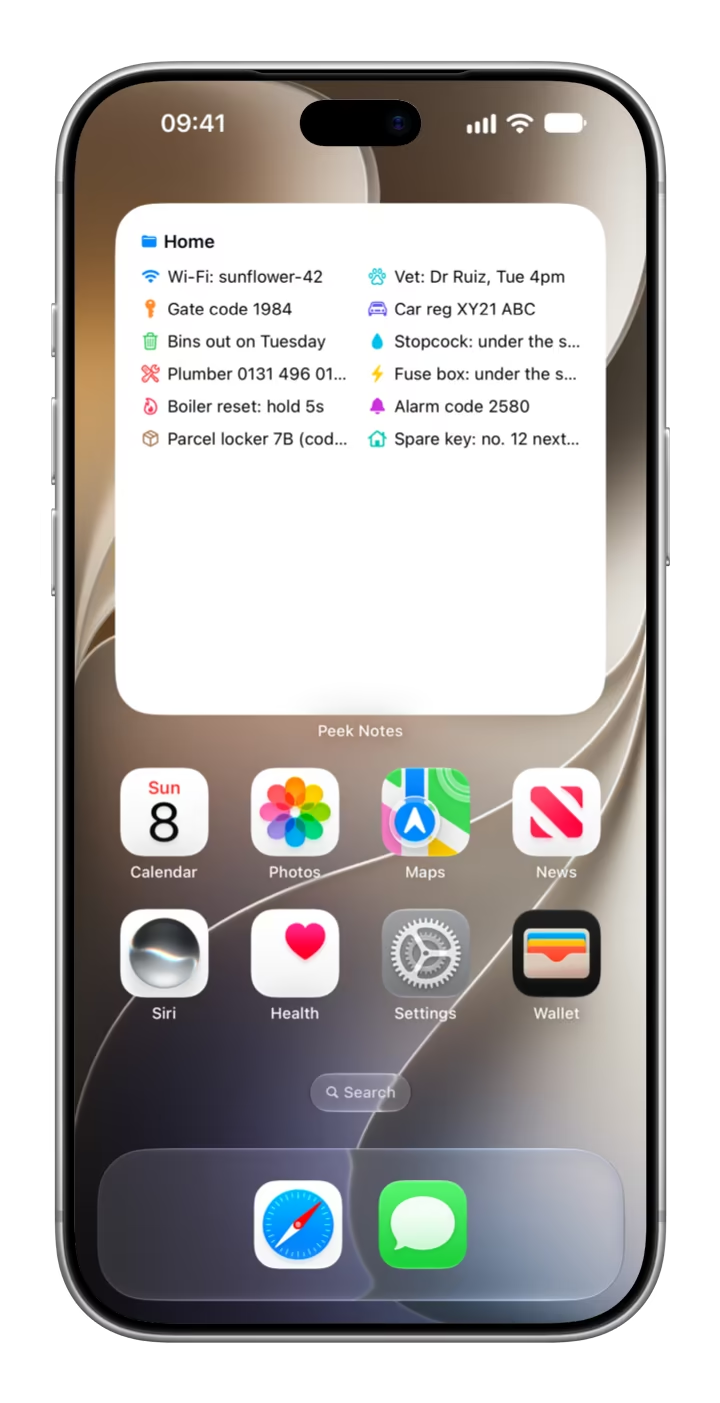

Peek Notes is a notes app for iPhone, iPad and Apple Watch that puts short notes on your Home Screen. It's for the little things you look up all the time: the Wi-Fi password, the gate code, the boiler reset, the plumber's number.
Each note is a line or two of text with an SF Symbol and a colour, so you can spot it at a glance, and notes live in folders. Each Home Screen widget shows one folder, with arrows to page through it when there's more to see. Your notes sync through your own private iCloud, and the Apple Watch app puts them on your wrist. It's free, with no in-app purchases and no account to make.
Peek Notes is made by Dave Ellis, an award-winning web and mobile developer in Edinburgh, Scotland, and published on the App Store by The Racing Line Software Limited.
| What it is | A notes app for short notes, with Home Screen widgets that show one folder each |
|---|---|
| Works on | iPhone, including iPhone Duo, and iPad with iOS or iPadOS 27 or later, and Apple Watch with watchOS 27 or later |
| Notes | A line or two of text each, with an SF Symbol and a colour, kept in folders |
| Colours | 13 preset colours, or any colour from the custom colour picker |
| Widgets | Small (one column), medium and large (two columns), and extra large on iPad (three columns); one folder each, with arrows to page through it |
| Apple Watch | A watch app, complications that show a note you choose, and a rectangular widget with a folder's first notes |
| Sync | Through your private iCloud database, or on your device without iCloud |
| Price | Free, with no in-app purchases |
| Account needed | No |
| Data collected | None |
| Ads, analytics, tracking | No tracking, analytics, third-party SDKs or third-party ads. One small banner shows my other apps |
| Made by | Dave Ellis, Edinburgh, Scotland |
| Published by | The Racing Line Software Limited |
| App Store category | Productivity |
| Help | Support · Privacy policy |
Each note is a line or two with its own symbol and colour, and notes live in folders. Write it once, then find it on your Home Screen whenever you need it.
Keep notes together in folders, like Home, Travel and Work, and give each folder a widget.
Each note is short: a code, a number, where something is kept.
Search any SF Symbol by name, or browse favourites grouped as General, Security, Devices and more.
Pick one of 13 preset colours, or any colour at all with the custom colour picker.
Put notes and folders in the order you want with drag and drop, and edit them any time.
Through your own private iCloud, to your iPad and your next iPhone. Without iCloud, notes stay on your device.
Four steps, from your first folder to the widget.
How it worksFrom your folders to your Home Screen to your wrist.
A large widget with the Home folder's twelve notes, in two columns.

A folder for each part of your life: Home, Travel, Work, or whatever suits you.

Every note has its own symbol and colour, so the one you need stands out.

Type a line, pick a symbol and a colour, and save. Edit it whenever things change.

Browse favourites by group, or search for any symbol by name.

More notes than fit? Arrows on the widget turn the page, right on the Home Screen.

A folder's first notes in a rectangular widget, and a note of your choice in each complication.

Your folders and notes on your wrist, even when your iPhone isn't nearby.

Tap a note to see it on its own, full screen.

On iPad, your folders and notes sit side by side, and the extra large widget shows a folder in three columns. Keyboard shortcuts keep it quick: ⌘N for a new note, ⇧⌘N for a new folder, ⌘Return to save and Esc to cancel. Your notes sync with your iPhone through your own iCloud.
Each widget shows one folder, and pages through it when there's more to see. Peek Notes is on iPad and Apple Watch too.
Touch and hold a widget, tap Edit Widget and pick a folder. Until you do, it shows your first one.
Small shows one column of notes, medium and large show two, and extra large on iPad shows three.
When a folder has more notes than fit, arrows on the widget page through them, right on the Home Screen.
Tap a widget and Peek Notes opens that folder.
Note text is privacy-sensitive, so iOS hides it while your iPhone is locked, such as in StandBy.
Folders and notes side by side, the extra large widget, and keyboard shortcuts for new notes and folders.
Browse your folders and notes on your wrist, in Peek Notes' own watch app.
Circular, corner, inline and rectangular complications show a note you choose, and a rectangular widget shows a folder's first notes.
Your iPhone sends your notes to your watch, so they're there even when your phone isn't.
It's all free: there are no in-app purchases and nothing to unlock. Your notes sync through your own iCloud, so they follow you to your iPad and your next iPhone.
Open Peek Notes, tap New Folder, give it a name and tap Create. There's no account to make.
Open the folder and tap +. Type a line or two, pick a symbol and a colour, then tap Save.
Touch and hold the Home Screen, tap Edit, then Add Widget, and choose Peek Notes.
Touch and hold the widget, tap Edit Widget and pick a folder. Tap the arrows to page through it.
The little things worth keeping to hand are often private: the alarm code, the gate code, where the spare key is. Peek Notes keeps your notes on your devices and in your own private iCloud, which I can't see. There's no account to make, no analytics and no tracking.
Widgets hide note text while your iPhone is locked, and your iPhone sends your notes to your Apple Watch over Apple's own connection between the two. One small banner shows my other apps: it downloads from my own website without any identifier, and the app doesn't record whether you see or tap it.
Peek Notes is a notes app for iPhone, iPad and Apple Watch that puts short notes on your Home Screen: the Wi-Fi password, the gate code, the boiler reset, the plumber's number. Notes live in folders, each note has its own SF Symbol and colour, and each widget shows one folder. It's made by Dave Ellis in Edinburgh, Scotland.
Anything short you look up often: the Wi-Fi password, the gate code, the boiler reset, the plumber's number, bin day, where the stopcock is. Each note is a line or two of text.
Make a folder and a few notes in Peek Notes first. Then touch and hold an empty part of your Home Screen, tap Edit, then Add Widget, search for Peek Notes, pick a size and tap Add Widget. Finally, touch and hold the new widget, tap Edit Widget and choose the folder it should show.
Arrows on the widget page through them, right on the Home Screen, so you don't need to open the app. A small widget shows one column of notes, medium and large widgets show two, and the extra large widget on iPad shows three.
Yes. Peek Notes is free, with no in-app purchases and no account to make. It shows one small banner for my other apps.
iPhone with iOS 27 or later, including iPhone Duo, iPad with iPadOS 27 or later, and Apple Watch with watchOS 27 or later. On iPhone and iPad it has Home Screen widgets, and on Apple Watch it has an app, complications and a widget.
Yes. The watch app shows your folders and notes, and complications put a note you choose on your watch face, in circular, corner, inline or rectangular styles. A rectangular widget shows a folder's first notes. Your iPhone sends your notes to the watch, so it shows them even when your iPhone isn't nearby.
Your folders and notes sit side by side, the extra large widget shows three columns of notes, and there are keyboard shortcuts: ⌘N for a new note, ⇧⌘N for a new folder, ⌘Return to save and Esc to cancel.
Yes. If you're signed in to iCloud, your folders and notes sync through your own private iCloud database, so they follow you to a new iPhone and to your iPad. Without iCloud, Peek Notes keeps them on your device.
Yes. Search any SF Symbol by name, or browse favourites grouped as General, Security, Devices and more. There are 13 preset colours, and a custom colour picker for any other.
Note text is marked privacy-sensitive, so iOS hides it where your iPhone is locked, such as in StandBy.
No. Peek Notes collects nothing: there's no account, no analytics and no third-party SDKs or ads. Your notes stay on your devices and in your own private iCloud, which I can't see.
Peek Notes shows one small banner for my other apps. It comes from my own website, not an ad network: the request carries no account, device or advertising identifier, and the app doesn't record whether you see or tap it.
Dave Ellis, an award-winning web and mobile developer in Edinburgh, Scotland, who also makes the motorsport app The Racing Line, the private location history app Location Vault, the contrast therapy timer Sauna & Plunge and the custom widget maker Widgeling. Peek Notes is published on the App Store by The Racing Line Software Limited.

Peek Notes is designed and built by Dave Ellis, an award-winning web and mobile developer in Edinburgh, Scotland. His motorsport app, The Racing Line, won Brand of the Year at the 2026 Race Media Awards and is used by more than 100,000 fans, and he also makes the private location history app Location Vault, the contrast therapy timer Sauna & Plunge and the custom widget maker Widgeling. Peek Notes is published on the App Store by The Racing Line Software Limited.
Questions or ideas? dave@theracingline.app · More about Dave
Page last updated